Export and Purge Administration
Users can export submitted eForms documents based on rule driven selection and have them processed automatically by a system job. Exported files are written directly to Azure Blob Storage. A download link is sent to configured recipients by email.
Export Scenarios allow users to export documents from the system based on the age and/or index values of the documents. These may be ad hoc, run-once scenarios, or scenarios that run every day or week, to serve the business needs.
Purge Scenarios provides the ability to purge database and object information out of the DataMagine system with a permanent status. This program runs as a scheduled task or can be run manually.
The purge feature is used to cleanup or remove objects permanently from eForms. It is linked to the export process to make sure that only successful objects exported would be removed.
Click Admin ➜ Export and Purge Administration. The List of Export Scenarios section appears with the following details:
|
Field |
Description |
|---|---|
|
Name |
The name of the export scenario. |
|
Folder Name |
The name of the folder. |
|
Modified At |
The date when the export scenario was modified. |
|
Created At |
The date when the export scenario was created. |
|
Created By |
The name of user who created the export scenario. |
|
Status |
The status of the export scenario. The following are the status:
|
|
Actions |
This column includes the following functions:
|
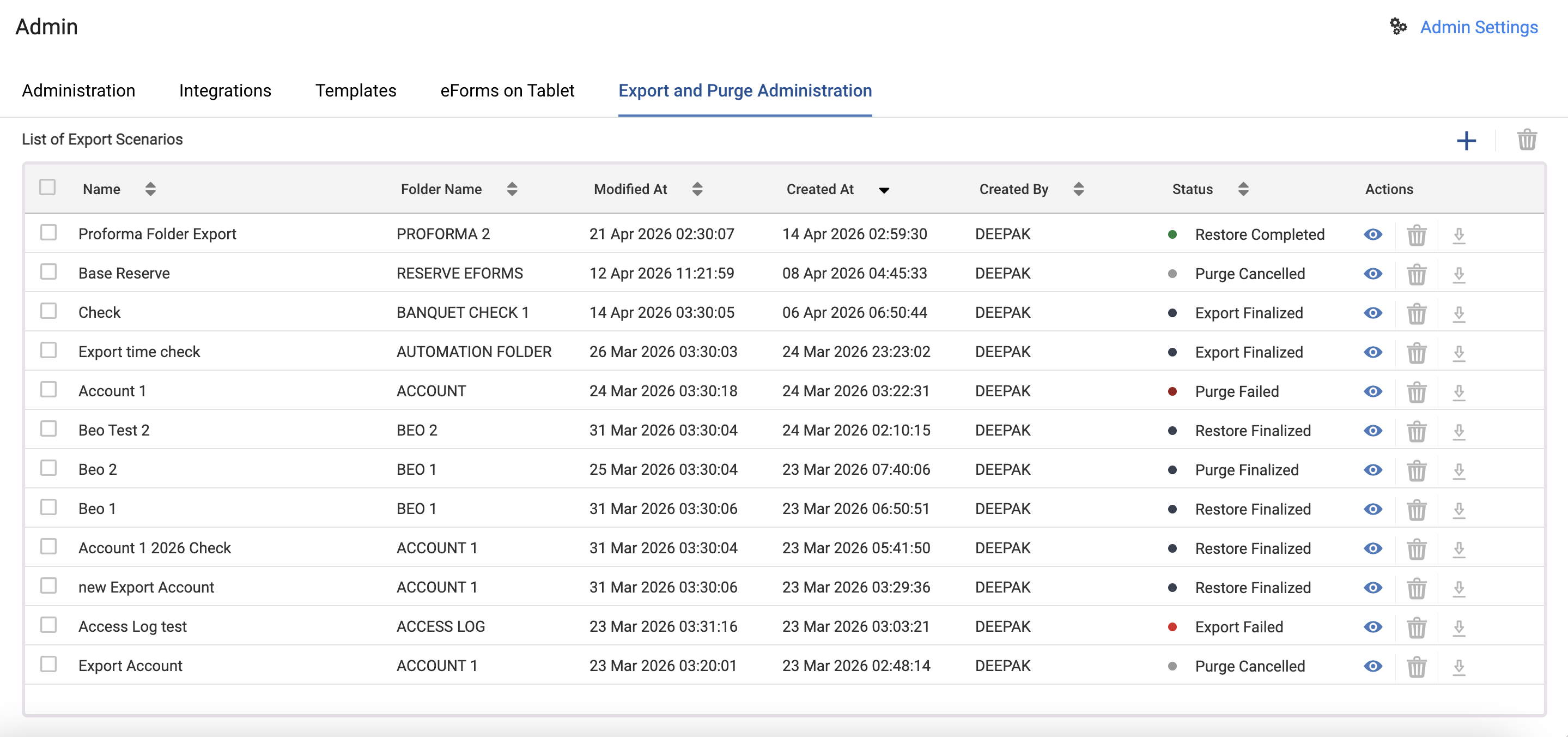
Users can perform the following functions under Export and Purge Administration:
-
Create new export scenarios
-
Modify export scenarios
-
Delete export scenarios